Deals go quiet
Weeks pass between the bid and the award. By the time you check in, someone else already has the order.
A daily call queue ranks everyone by how overdue they are.
SRM CRM is built for B2B field reps who sell into projects, not just accounts. It tracks every lead, project and bid, ranks who's due for a follow-up, and puts your whole territory on a map, on your desktop and your phone.
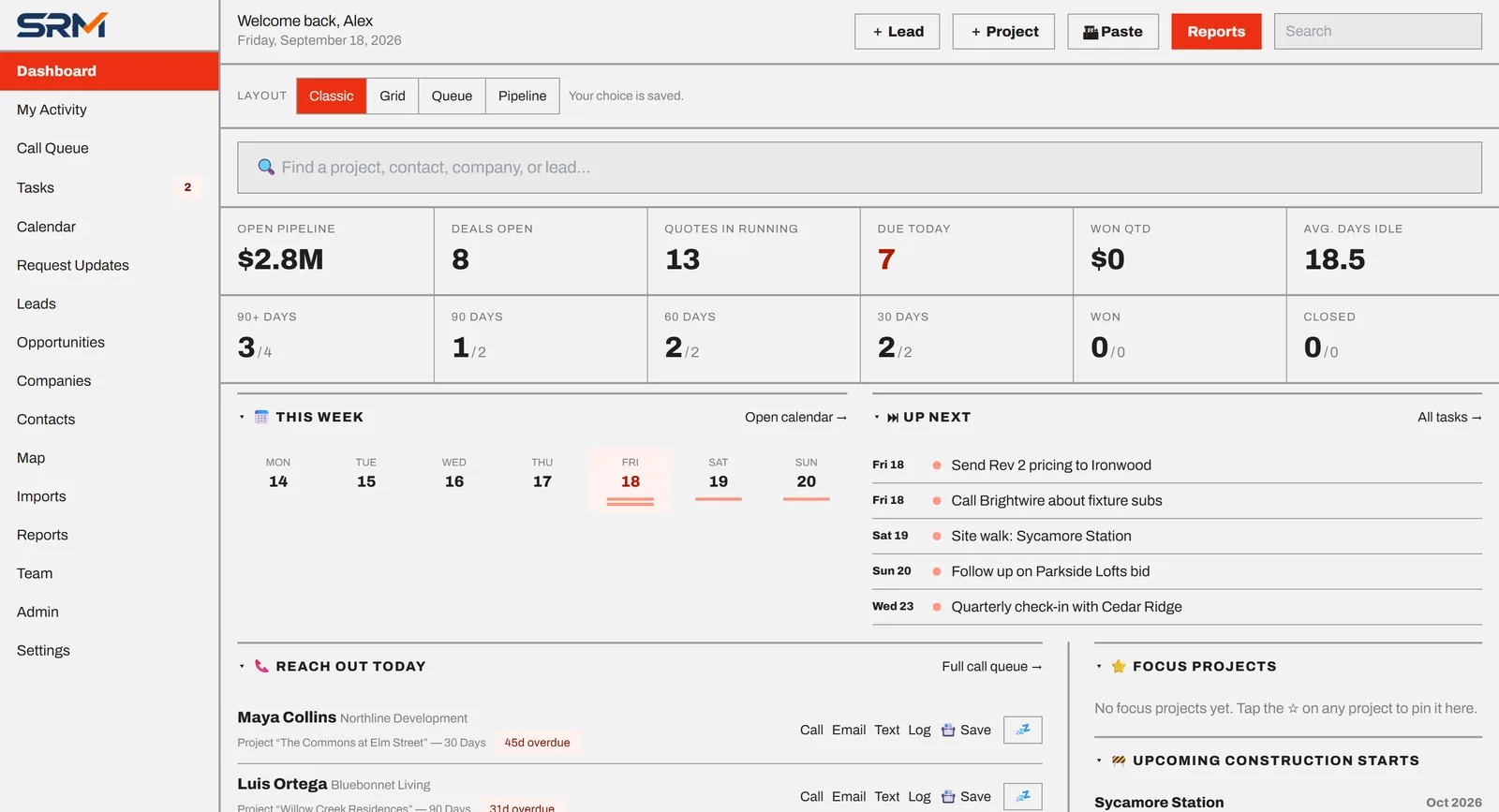
Field reps juggle dozens of jobs, each with a developer, a few bidding contractors and a timeline that keeps moving. Generic CRMs were built for inside sales, so the follow-up plan ends up on sticky notes.
Weeks pass between the bid and the award. By the time you check in, someone else already has the order.
You know a job is "coming up," but not whether it's 90 days or 30 days out, so you're too early or too late.
Spreadsheets can't show which jobs and accounts are near each other, so windshield time gets wasted.
No consultant required. Bring what you already have and start working your list the same day.
Load the contacts, companies and jobs you already track.
Every opportunity has a clear stage, and every person has a follow-up rhythm.
Open SRM CRM and it tells you who's due today and why.
Everything below is the working product, shown with sample data.
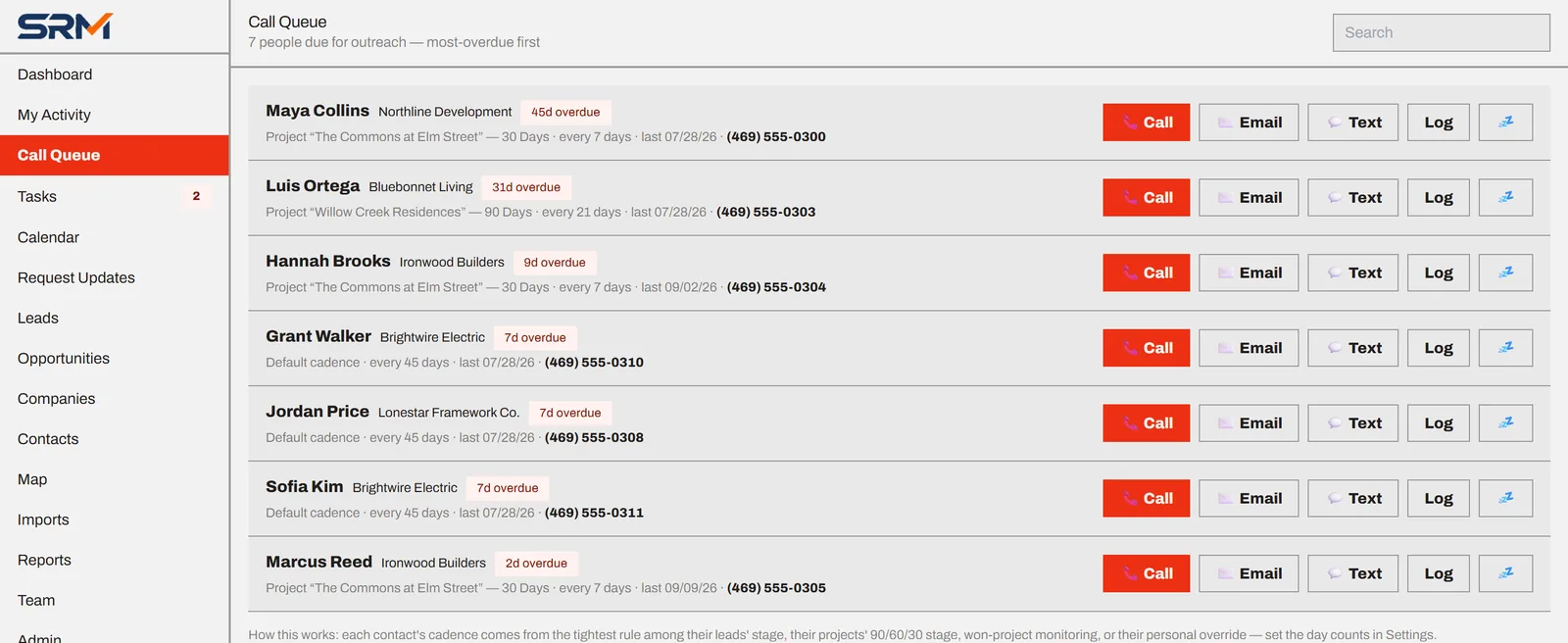
Each contact gets a touch rhythm based on how close their projects are to starting. SRM CRM puts the most overdue people first.
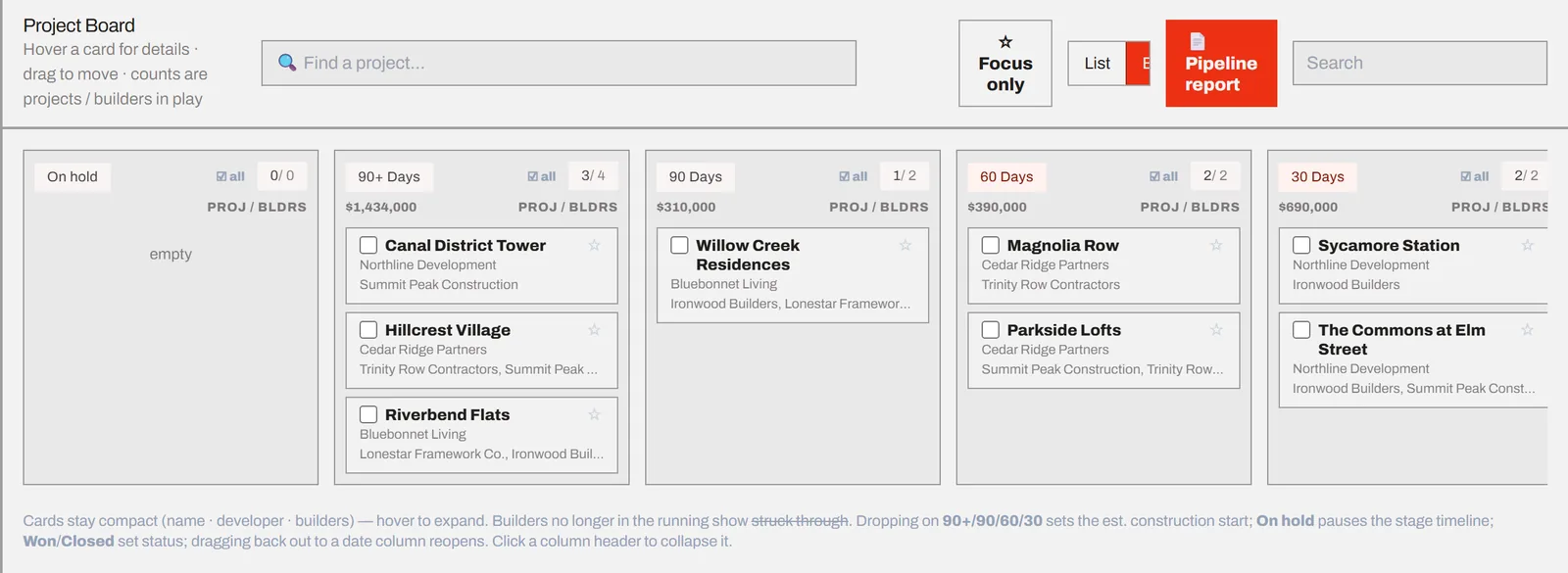
Projects sort into 90+, 90, 60 and 30-day columns from their construction start date, and move forward on their own as the date approaches.
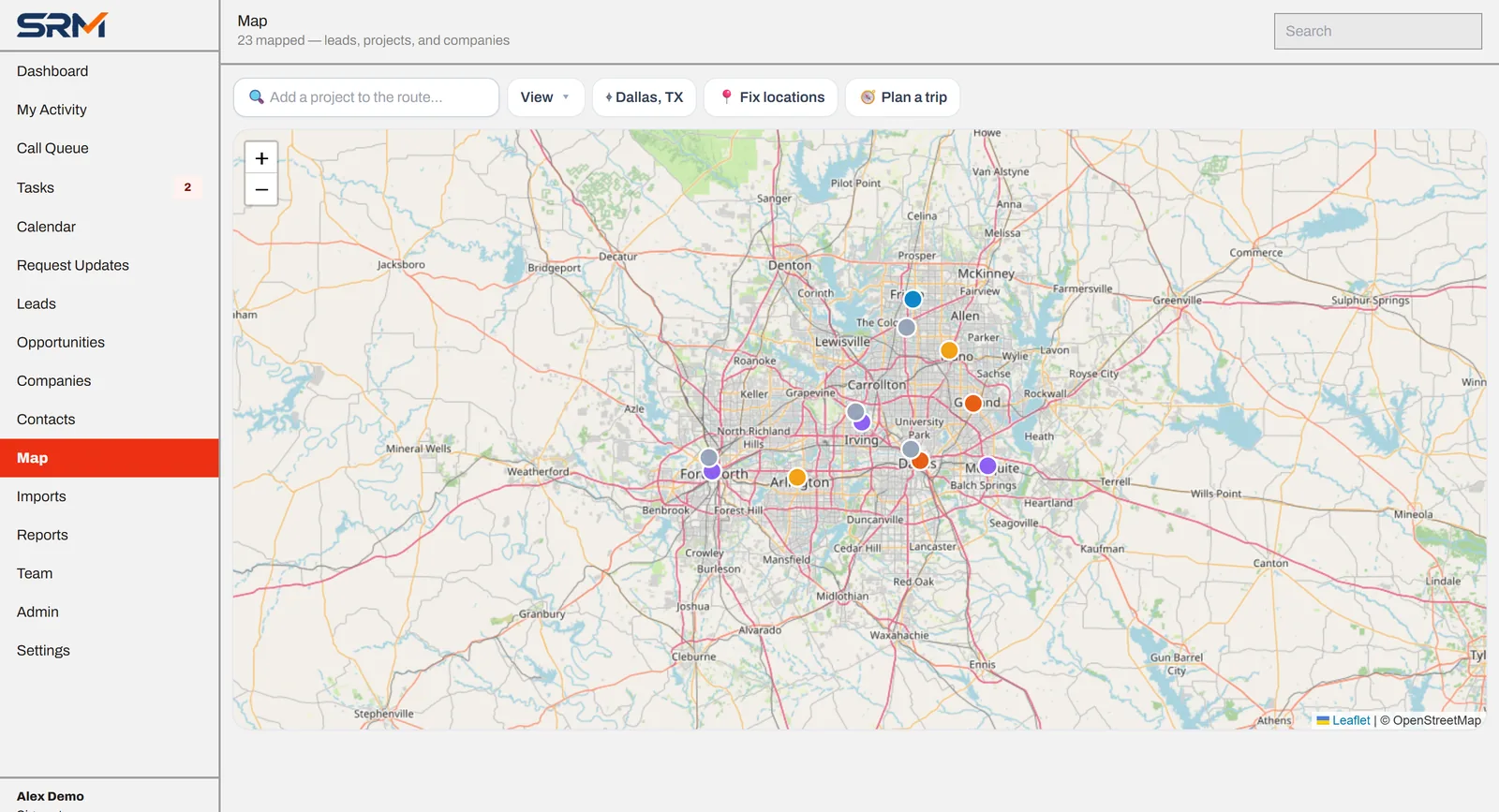
Every project, lead and company is pinned automatically from its address. Plan a day of visits and add stops by name.
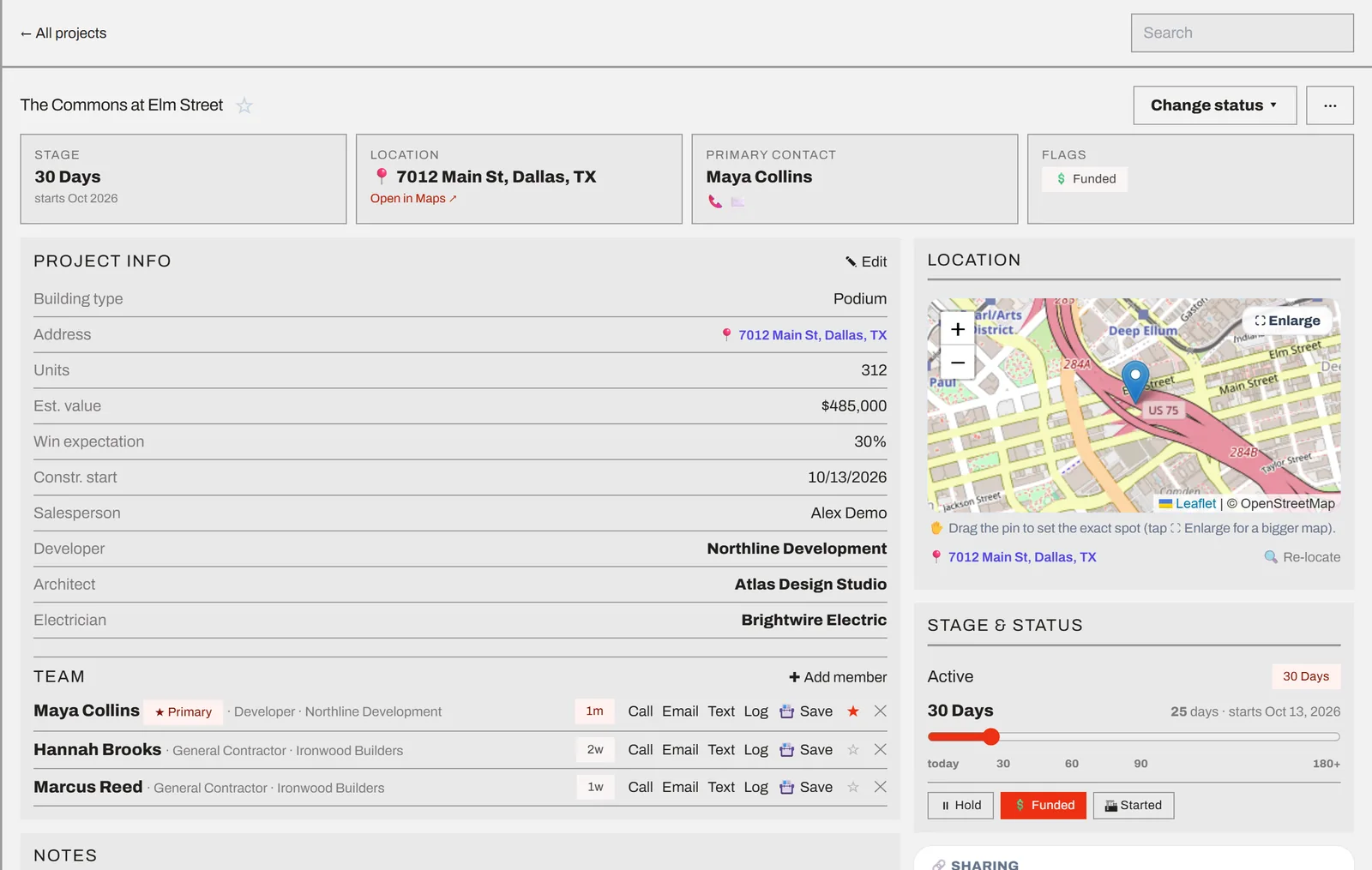
Stage, location, developer, architect, electrician, the whole project team and every bid, with call, email and text buttons next to each person.
Cycle through saved drafts, edit, then open in Outlook or your phone's messages.
To-dos, appointments and reusable playbooks, with a calendar feed for your phone.
Pipeline, customers, companies and contacts. Printable and CSV export.
Send any contact straight to your phone's contacts in one tap.
Connect Microsoft 365 to link email conversations to your records.
Build your own filtered reports and track activity goals.
Private records by default, with sharing to one teammate or the whole team.
Find and merge duplicate companies and contacts, and keep their history.
If your sales depend on jobs with timelines, several decision-makers and competing bids, SRM CRM fits how you already work.
Lighting, electrical, fixtures, finishes and other packages sold to developers and contractors on multifamily and commercial jobs.
See the construction workflow →Multiple lines, shared accounts and a territory to cover. Track who owns each relationship and keep the whole team on cadence.
Outside sales teams working contractor accounts, with quotes out on several jobs at once.
Any team that visits customers in person and wins deals through steady follow-up. Stages, cadences and fields are all adjustable.
SRM CRM follows a job from first rumor to purchase order, including the reality that several contractors bid the same project.
Log a planned project and the developer, architect and engineer behind it.
When the invitation to bid arrives, one click turns the lead into a project and carries its contacts over.
Track each contractor's bid separately, with revisions, due dates, amounts and plan links.
As the construction start gets closer, the project moves forward and follow-ups speed up.
SRM CRM is just opening to outside teams, so you won't find a wall of customer logos or made-up testimonials here. What you will find are real screens of a working product, and published prices.
Pick a plan for your team size. Add users or AI features when you need them.
For the individual rep who wants a real system instead of a spreadsheet.
For small teams that share accounts, run routes and report up to a manager.
For larger teams, multiple markets, or a move from another CRM.
Prices in USD. This is planned launch pricing and may change before general availability. Add-on pricing will be shared when early access opens.
Your records belong to you. Export contacts, companies, projects and reports to CSV whenever you want.
Each rep's records are private until they share them with a teammate or the whole team. Admins manage who can see what.
All traffic is encrypted over HTTPS. If you connect Outlook, its access tokens are stored encrypted, and you can disconnect any time.
AI features are an add-on you choose to turn on. We explain exactly what they do in our AI disclosure.
Start with a CSV import. Every import lands in a review screen first, so nothing messy slips into your data.
It runs in your browser. Add it to your phone's home screen and it opens full-screen like a regular app.
We'll add you to our early-access list and reach out as spots open, usually to set up a short walkthrough and make sure SRM CRM fits how your team sells. Joining is free and doesn't commit you to buy anything.
We're opening access to teams in waves. We haven't announced a general launch date yet; waitlist members hear first.
No. Construction supply is the workflow that's fully built out today: leads, invitations to bid, one bid per contractor and 90/60/30-day stages. The core (contacts, companies, cadences, call queue, map, tasks and reports) works for any B2B field-sales team, and stages, roles and markets can be adjusted.
Starter ($129/month) includes 1 user and Pro ($299/month) includes 3. You can add users to either plan. Additional-user pricing will be shared when early access opens. Custom plans are sized to your team.
Yes. Every plan includes CSV import with column mapping and a review step before anything is saved. The AI add-on can also pull contacts and projects out of pasted emails, PDFs and business-card photos. Custom plans include hands-on migration.
Yes. SRM CRM runs in any modern browser and can be installed to your home screen on iPhone and Android, where it opens full-screen like a native app. You can also save any contact straight to your phone's address book.
On every plan, email drafts open in Outlook (web or desktop) or your default mail app, ready to send. Pro adds a Microsoft 365 connection that links your email conversations to the right records.
They're optional. The AI add-on can read a pasted email or PDF and suggest contacts, companies and projects, scan business cards, draft custom emails, research a lead, and help find a project's location. Every suggestion goes to a review screen before it's saved. See our AI disclosure for details.
You do. You can export your records to CSV at any time. See our Privacy Policy and Terms of Use for the details.
Tell us a little about your team. We'll reach out when your spot opens.
Thanks for your interest in SRM CRM. We'll email you as soon as your early-access spot opens.